
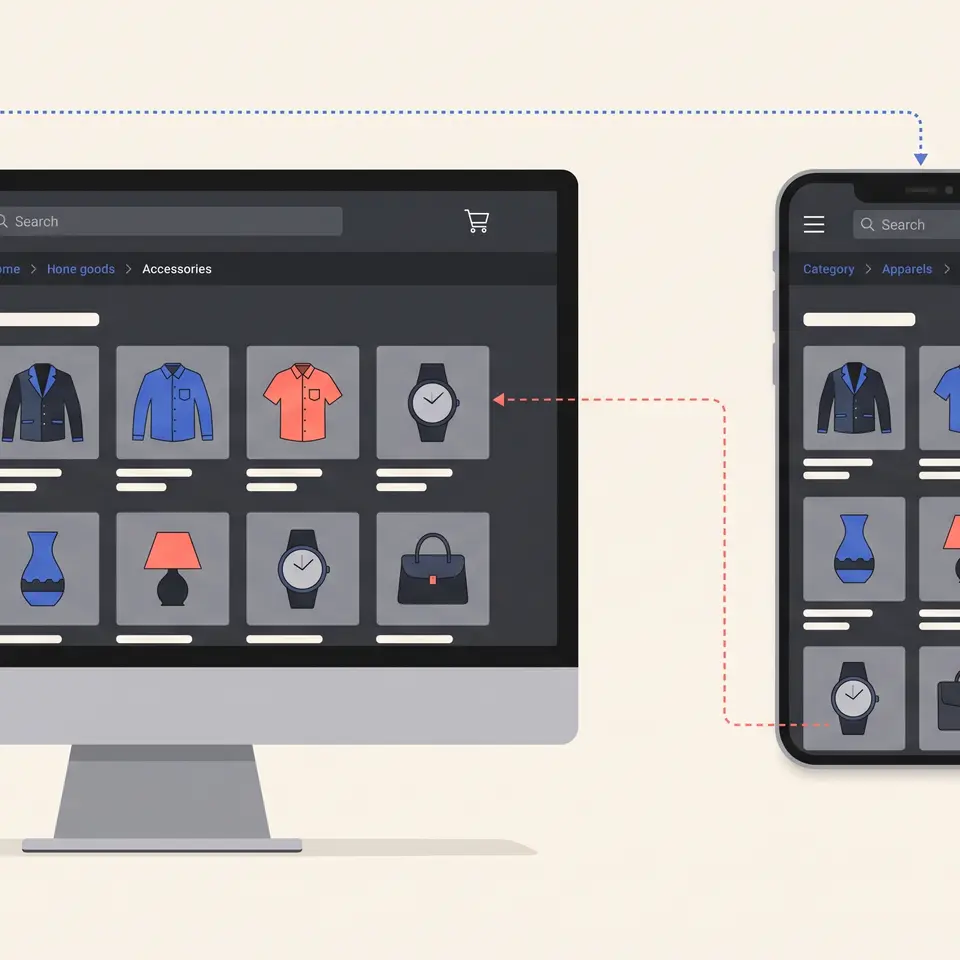
Ecommerce navigation best practices help shoppers understand what a store sells, move between meaningful product groups, and recover when they take the wrong path. The useful approach starts with the real catalog rather than a fixed menu formula. Runner AI can use the products, categories, storefront, and constraints you provide to prepare a focused navigation change that remains visible in the files and responsive preview before publication.

Start ecommerce navigation best practices with the catalog
Navigation is an explanation of the catalog, not a decorative row of links. Begin by listing the product groups a shopper can actually browse, the attributes that distinguish them, and the routes that already exist. Include product names, categories, images, prices, variants, inventory, SEO fields, and publication status when those details affect the proposed hierarchy. A link should not promise a collection that is unpublished, empty, or assembled from assumptions about products the store does not carry.
The right structure depends on the buying decision. A small home-goods catalog may need a few room and product-type routes. An apparel store may need category paths plus clear access to fit, size, or seasonal groupings. A technical catalog may need broader parent categories before shoppers compare compatibility and specifications. Runner AI can work from the catalog context and desired shopper path you supply, but the operator still decides which grouping is accurate, useful, and ready to expose.
Treat labels as factual commitments. “New arrivals,” “in stock,” “sale,” and audience-specific terms should correspond to current rules and products. If a category name is an internal merchandising term, rewrite it in language a first-time shopper can understand without inventing a broader promise. The adjacent AI ecommerce collection page builder workflow helps shape the browse destination after a navigation choice has been made.
Turn the hierarchy into a bounded Runner AI brief
A useful request identifies the current problem and the smallest navigation change worth reviewing. Provide the existing header or menu, relevant routes, catalog categories, brand guidance, device priorities, and any links that must remain available. Explain whether shoppers are failing to discover a collection, losing their place, or encountering a desktop structure that becomes crowded on a phone. Separate observed evidence from a hypothesis so a proposed revision does not present a guess as a proven customer preference.
Ask Runner AI for a concrete storefront change rather than a universal redesign. For example: “Reorganize the primary product navigation around these four published categories. Keep account, search, and cart access unchanged. Preserve the existing policy links. Show the current category clearly, and adapt the same hierarchy for phone without hiding product routes behind campaign copy.” Runner AI can create or revise storefront files from this supplied context, while chat and Design Mode support focused follow-up changes.
Keep the output reviewable. Inspect which labels, destinations, components, and responsive states changed. Check that every route resolves to the intended page and that unchanged navigation still behaves as expected. A generated proposal does not prove the information architecture is correct, and it does not authorize publication. It gives the operator an implemented option to compare with the brief, the current catalog, and the working storefront.
Review desktop, tablet, and phone paths before publishing
A navigation system must remain understandable as the available space changes. Runner AI provides desktop, tablet, and phone previews for storefront work. Use each view to trace realistic paths from the homepage to a category, from a collection to a product, and back to a broader scope. Confirm that labels are not clipped, interactive targets remain distinct, menus can be opened and dismissed, focus is visible, and the shopper can tell where the current page sits in the hierarchy.
Do not assume the desktop menu should merely shrink. A wide layout can expose several categories at once, while a phone may need a clear sequence of parent and child choices. Preserve the meaning and destination of each route even when its presentation changes. The AI ecommerce mobile store builder workflow covers the wider job of reviewing storefront sections and shopper actions across small screens.
Test ordinary and imperfect states. Use a long category label, a collection with no currently publishable products, an unavailable item, a translated label when localization is in scope, and a direct visit to a product page from search or a campaign. Check keyboard movement and text zoom as well as pointer and touch behavior. If the proposal makes one path clearer but removes access to account, cart, search, support, or policy information that the store relies on, revise the smallest affected part before approval.
Keep navigation evidence and ownership explicit
After publication, evaluate navigation with evidence that matches the original problem. Store search terms, confirmed support questions, route errors, usability observations, and carefully interpreted journey data may reveal where labels or groupings confuse people. One signal should not be treated as proof of a cause. Record the affected path, the evidence source, the customer decision, and the proposed correction before asking for another change.
Runner AI can help prepare a focused revision from the evidence and store context you provide. Catalog, inventory, pricing, policy, analytics, accessibility, and legal systems remain authoritative for their own facts and controls. A responsive preview does not prove that a route is indexed, a product is available, a translated term is appropriate, or a purchase can be completed. Responsible owners should verify those conditions and test the public path after release.
Navigation should also stay coordinated with the storefront entry point. A homepage that promotes a product family needs a route that leads to the same scope and uses compatible language. The AI ecommerce homepage builder workflow helps connect that entry experience to current products and priorities. When the navigation issue belongs to another website, conversion, marketing, or commerce workflow, browse all Runner AI features rather than stretching one menu revision beyond its evidence.
Ecommerce navigation best practices FAQ
What are ecommerce navigation best practices?
Ecommerce navigation best practices are methods for organizing product routes, labels, search, utility actions, and location cues so shoppers can understand a catalog and move through it. The right implementation depends on the store’s actual products, hierarchy, devices, and customer tasks. Begin with verified catalog and route information, then review the resulting paths instead of applying a fixed number of menu items without context.
How can Runner AI help improve ecommerce navigation?
Provide Runner AI with the current storefront files, catalog structure, relevant routes, desired shopper path, brand constraints, and evidence of the navigation problem. It can prepare a bounded storefront revision that you can inspect through changed files and responsive previews. Your team remains responsible for verifying labels, destinations, product state, accessibility, connected services, and the decision to publish.
What should I include in an ecommerce navigation brief?
Include the existing hierarchy, published categories and collections, important utility links, device priorities, brand terminology, routes that must remain stable, and the observed problem. Add representative edge cases such as long labels, unavailable products, direct product-page visits, and translated content when relevant. State which facts are verified and which ideas are hypotheses so the proposal has clear review boundaries.
How should I test ecommerce navigation on mobile?
Trace common tasks in the phone preview: opening and closing the menu, moving through parent and child categories, reaching a product, returning to a broader scope, using search, and accessing cart or account controls. Check touch targets, keyboard focus, text zoom, long labels, scroll behavior, and error states. Then repeat the important path on the public storefront after publication.
Do ecommerce navigation best practices guarantee more sales?
No. Clear navigation can support product discovery and reduce avoidable confusion, but a navigation change does not guarantee conversion, revenue, or search performance. Product demand, price, availability, trust, checkout, traffic, and many other conditions affect commercial outcomes. Define the problem, verify the implementation, and use appropriate evidence over time before attributing a result to the change.