
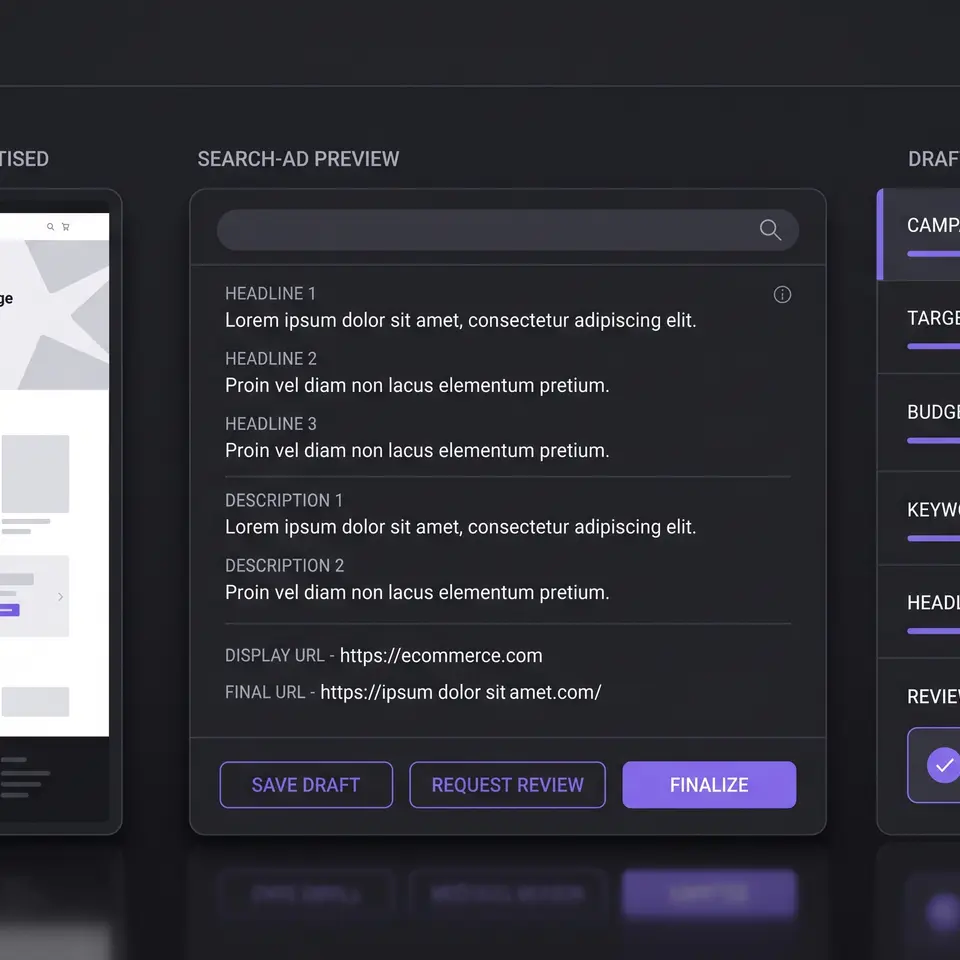
A Google Ads campaign in Runner AI starts with your store destination, objective, markets, and connected account, then becomes an editable Search campaign draft. You can inspect the proposed budget, bidding strategy, ad groups, keywords, headlines, descriptions, sitelinks, audiences, and landing pages before an authorized publish action. The differentiator is a store-aware review surface, not automatic performance claims.

Build a Google Ads campaign from a defined store goal
Begin with the destination and the business action the campaign should support. In Runner Ads, the first campaign step asks for the store page, objective, countries, and Google Ads account. That boundary matters because a campaign for a seasonal collection needs different evidence from one promoting a single product or a service. Supply the current URL, approved product facts, offer terms, market, and constraints instead of asking the system to infer details that customers will later see.
Runner AI can use that input to prepare a plan containing website research, key products, value propositions, campaign recommendations, budget, bidding strategy, and ad-group structure. Treat the plan as a proposal. Confirm that the destination exists, the product is available, the offer is current, and the selected account belongs to the intended organization. If the store or goal changes after recommendations are generated, regenerate the proposal rather than carrying stale assumptions into the next step.
This workflow is narrower than a generic marketing plan. The online advertising platform workflow explains how provider accounts, reporting, and supported controls differ across channels. A Google Search campaign here stays tied to the exact store page and account that your team can verify. Runner AI does not guarantee impressions, clicks, conversions, revenue, or a particular cost, and it does not make budget or targeting judgment on behalf of the accountable operator.
Ground the Search campaign in approved product and offer facts
Search ad copy is compact, but the evidence behind it is not. Before generating headlines or descriptions, collect the product name, category, current price, available variants, confirmed benefits, shipping or return terms, promotion dates, and landing-page promise that the campaign may use. Mark any claim that still needs legal, brand, inventory, or policy review. A persuasive phrase becomes a liability when the destination cannot support it.
Use the store URL as a research boundary, not as permission to invent missing facts. Runner Ads can organize a campaign around the business type, key products, value propositions, market, and objective found in the supplied context. Your team should still decide which products deserve spend, whether the conversion goal is configured correctly, and whether the proposed audience is appropriate. Keep first-party store behavior and provider-reported campaign metrics as separate evidence classes when you later evaluate results.
The performance marketing guide provides the adjacent measurement discipline: define the action, account, date range, attribution assumptions, destination, and approval owner before interpreting a dashboard. That same discipline improves campaign creation. It lets reviewers trace every headline and keyword theme back to an approved product, offer, customer need, or store page instead of accepting fluent copy as proof.
Edit keywords, ad groups, copy, budget, and audience together
After planning, Runner Ads exposes the Search campaign as editable structure rather than a sealed answer. Review the campaign name, daily budget, bidding strategy, locations, ad groups, final URLs, keywords, and match types. Inspect the headlines, descriptions, sitelinks, callouts, and audience settings in the same pass. A keyword may look relevant while pointing to the wrong page, and a strong headline may promise a product detail that the selected destination never mentions.
Organize ad groups around coherent shopper intent. Keep each group close enough to one destination that its keywords and copy can share a clear promise. Remove terms that describe products the store does not carry. Check exact, phrase, and broad match choices deliberately instead of treating one match type as universally correct. The useful output is a draft whose assumptions are visible and editable; it is not a claim that the generated structure is optimal.
Budget and bidding settings also need an owner. Runner Ads can place proposed values beside the rest of the campaign, but a person with the appropriate authority must confirm spending limits, conversion configuration, geographic coverage, and account access. Availability and supported actions can depend on the connected provider, account state, organization access, product state, and current rollout. Keep unknown values unknown, and resolve provider errors before interpreting a draft as launch-ready.
Review the Google Ads campaign preview before publication
The final review should read like a release check, not a formality. Runner Ads renders a Google Search preview from the draft headlines, descriptions, final URL, and sitelinks. Compare that preview with the destination on representative screen sizes. Confirm the account, campaign name, budget, bidding strategy, locations, audience, ad groups, keywords, match types, copy, and links. Use the edit controls to return to the relevant step when something is wrong.
Then verify the handoff beyond the ad. The landing page should preserve the same product, offer, price, availability, and call to action. Tracking and consent requirements need their own checks, and a preview does not establish that billing, conversion actions, or external provider policy are configured correctly. Publication is consequential: approve it only after the responsible operator understands what will change and has permission to change it.
Runner AI keeps this work reviewable by connecting store context, campaign generation, editing, and preview in one flow. It does not remove Google Ads policy, billing, authorization, or measurement responsibilities. If you are still comparing broader marketing workflows, browse the Runner AI feature catalog before assigning one page or tool a job it does not own.
Use marketing campaign management software when ownership, approvals, and handoffs extend beyond this single campaign draft.
Help me draft a Google Search campaign for this store. Use the store URL, connected Google Ads account, market, objective, approved product and offer facts, audience constraints, budget, and bidding limits I provide; return editable campaign settings, ad groups, keywords, headlines, descriptions, sitelinks, Search previews, and a review checklist before any publication.
Build a reviewable Google Ads campaign in Runner AI
Google Ads campaign FAQ
What inputs should I prepare before drafting a Google Ads campaign?
Prepare the store URL, intended Google Ads account, campaign objective, target markets, approved product and offer facts, audience constraints, daily spending boundary, and bidding limits. Include the landing page that should receive traffic and identify who can approve copy, targeting, budget, tracking, and publication. Runner AI can structure those inputs into a reviewable draft, but it should not fill factual or authorization gaps with assumptions.
Can Runner AI create Search campaign keywords and ad copy?
Runner Ads can generate and expose a Search campaign draft with ad groups, keywords, match types, headlines, descriptions, sitelinks, callouts, audience settings, and final URLs. Reviewers can edit the structure and inspect a rendered Search preview. Generated text remains a proposal: verify product claims, offer terms, trademark use, destination accuracy, provider policy, and every other customer-facing statement before publication.
Does Runner AI publish a Google Ads campaign automatically?
No automatic publication should be assumed. Runner Ads provides an in-app planning, editing, review, and supported publish flow for Google Ads, but external changes require the correct connected account, provider support, organization access, and explicit operator approval. Confirm the exact campaign and returned provider state after any consequential action. A draft or preview is not evidence that a campaign is live.
How should I evaluate a Google Ads campaign after launch?
Start with the objective and conversion definition approved before launch. Confirm the provider account, reporting period, attribution settings, spend, campaign state, and destination, then keep Google Ads metrics separate from first-party store evidence. Review product availability, offer accuracy, landing-page behavior, and tracking alongside campaign results. Do not infer causation or guaranteed improvement from one metric movement or a short reporting window.