
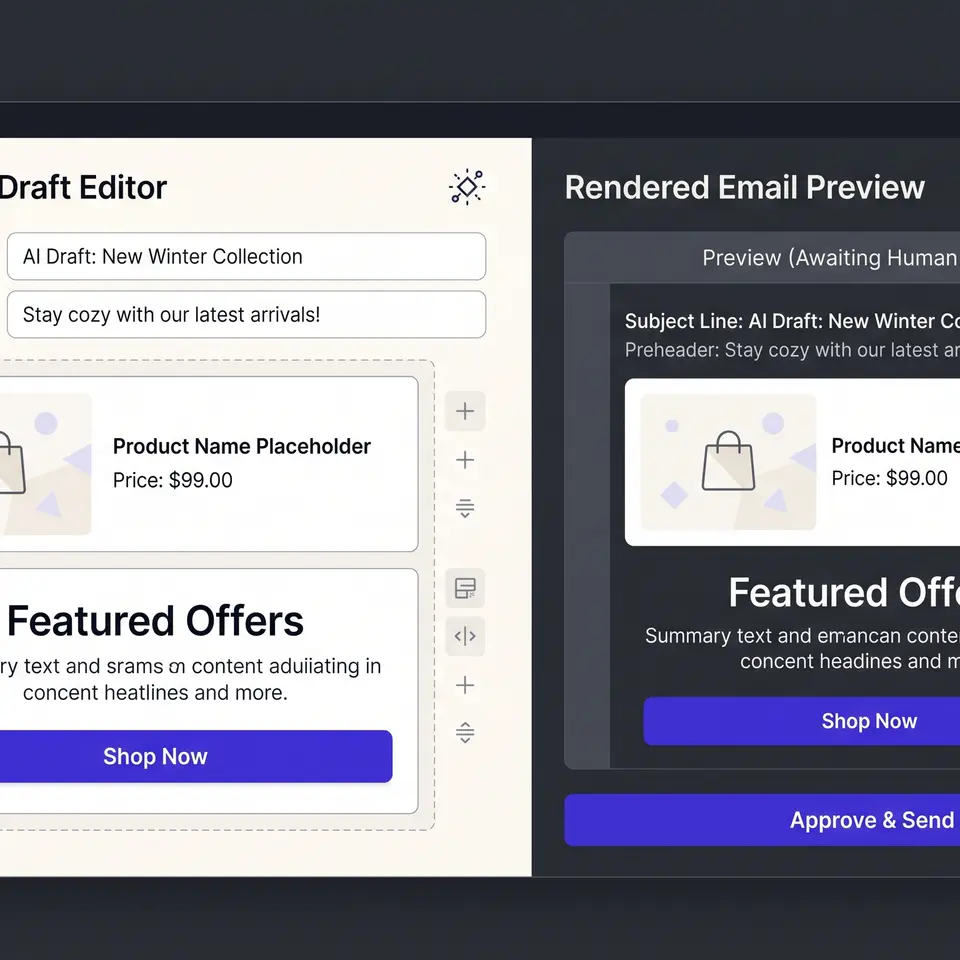
An AI email generator in Runner AI turns a campaign prompt into a reviewable email draft inside the store project. Operators can work with a separate subject, preheader, and structured body, add supported variables and content blocks, then inspect the saved version in a rendered preview. The result stays a draft until the operator reviews the campaign and its delivery controls.
Start an AI email generator workflow with a campaign brief
Runner AI begins with the commercial job rather than an isolated blank email. In the Email workspace, an operator can describe the campaign outcome in a prompt, including the customer moment, the products or collection involved, the intended audience, and the brand direction. The campaign then has a place in the same project as automated customer emails and other marketing work. Draft and changed campaigns are surfaced for review instead of being treated as finished simply because text was generated.
A useful brief names the inputs that should shape the draft. For a product launch, that can include approved product names, the collection destination, the main offer or announcement, and wording that must not appear. For a restock, the brief should identify the exact products or variants and avoid implying that every option is available. Runner does not need a claim about perfect personalization to make this useful: the operator supplies the campaign goal and verified store facts, then evaluates the resulting email structure against those inputs.
This scope distinguishes the workflow from AI ecommerce abandoned cart emails. Cart recovery owns a specific lifecycle moment after an incomplete checkout. The AI email generator page owns the broader evaluation question: how a store team moves from a campaign prompt to an editable, previewable email draft.
Edit subject, preheader, and body as structured email inputs
The draft is not one undifferentiated block of generated prose. Runner’s email editor separates the subject and preheader from the body so each surface can be reviewed for its own job. Header fields remain single-line content, while the body supports email-specific authoring controls. Depending on the available template catalog, operators can edit text, links, alignment, buttons, images, and supported runtime blocks without flattening the email into pasted HTML.
Supported automatic variables also stay visible as structured inputs. A recipient name can be inserted into text, while link or image variables are limited to the context that accepts them. Required runtime blocks can be protected from deletion, and optional blocks can be added when the current template exposes them. These constraints matter because a visually plausible email can still be invalid if it drops a required order summary, uses an unsafe link, or puts a variable into the wrong field.
The operator remains responsible for factual content. Product names, prices, offer terms, dates, inventory statements, and destination URLs should come from reviewed store information. The editor helps preserve email structure and validates the draft envelope; it does not turn an unverified prompt into approved catalog data.
Compare the saved draft in an authoritative rendered preview
Email review needs more than reading source fields. Runner provides an authoritative preview that presents the subject, preheader, and rendered HTML for the saved draft. When local edits have not been saved, the preview identifies that it still represents the last saved version. That boundary prevents a reviewer from assuming an unsaved body change is already reflected in the rendered result.
The preview is a practical checkpoint for layout and content. Operators can confirm that the subject and preheader support one another, images and buttons appear in the intended sequence, automatic content has a sensible place, and the call to action leads where the brief says it should. A rendered email can still vary by receiving client, so this checkpoint should be paired with the available test-send and delivery review rather than presented as universal inbox proof.
For an adjacent view of lifecycle planning, AI ecommerce winback email campaigns covers reactivation messages and suppression decisions. Both workflows share the same principle: generated work becomes useful when its inputs and output can be inspected before a team decides to send it.
Keep generation, approval, and delivery as separate decisions
Submitting a prompt does not authorize delivery. Runner keeps custom campaigns in explicit states such as draft, scheduled, live, paused, completed, or failed, and the Email workspace can put drafts and changed campaigns into a review queue. Operators can inspect the campaign before opening recipient controls or other delivery actions. Built-in customer emails can also be customized, but their templates and available controls may differ from a custom campaign.
This separation protects the operational details that generated copy cannot determine. Before delivery, review the recipient source, consent basis, sender configuration, destination links, product availability, offer dates, and any required runtime content. Save the draft, reopen the preview, and use a test send when that action is available. A valid draft means the editor accepted the structure; it does not prove deliverability, legal compliance, product accuracy, or campaign performance.
For broader campaign planning tied to catalog and brand context, review AI ecommerce email marketing. Use the Runner AI feature catalog when the next evaluation concerns storefront building, conversion, media, or commerce operations. Keeping the email-generator intent focused avoids promising that one draft automatically changes the store, selects an audience, or publishes a campaign.
Create a campaign draft from my campaign goal, audience, approved product names and images, destination URL, and brand voice. Return a reviewable subject, preheader, structured email body, and rendered preview. Keep it as a draft and do not send or publish it.
Open the AI email generator in Runner AI
AI email generator FAQ
What inputs should I give the AI email generator?
Start with the campaign goal, intended audience, customer moment, approved product or collection details, destination URL, and brand direction. Add constraints such as offer dates, claims to avoid, or a required call to action. Runner can turn that brief into a draft for review, but product facts and commercial terms should be verified before they are included.
What can I edit in a generated email draft?
Runner separates the subject, preheader, and structured body. The available editor catalog can expose text formatting, links, alignment, buttons, images, automatic variables, and runtime blocks. Some blocks may be required and protected from deletion. Exact options depend on the email template, so review the controls shown for the current draft rather than assuming every campaign supports every block.
Does the preview update before I save my changes?
The authoritative rendered preview represents the saved version. If the local draft contains unsaved changes, Runner indicates that the preview is still showing the last saved result. Save the valid draft before using the preview as the review artifact, then compare its subject, preheader, body layout, images, links, and buttons with the campaign brief.
Does Runner AI send the email automatically after generation?
No. The AI email generator produces reviewable campaign work, not automatic approval. Recipient controls, test sends, scheduling, and delivery depend on the campaign, current product availability, account access, and configuration. Review the saved draft, audience, sender, consent, links, and store facts before choosing any supported delivery action.